
|
CoSVi Section |
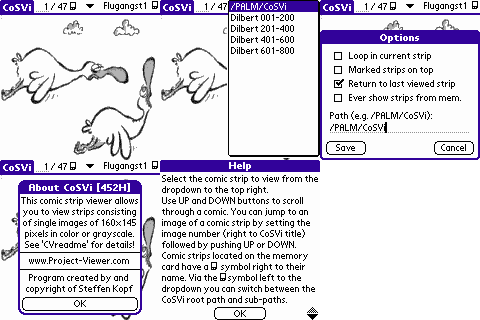 |
"CoSVi" (Comic Strip Viewer) is a comic strip viewer application. The program has been developed using PocketC for PalmOS and is free software. Select the comic strip to view from the dropdown to the top right. Use up and down buttons to scroll through a comic. You can jump to an image of a comic strip by setting the image number (right to the main screen header) - followed by pushing up or down button. You can mark and unmark your favourite strips. Sort your comics list strictly alphabetical or by setting your favourites on top (see Options). Cycle in a strip in loop or through all strips by up and down buttons (see Options). You can return to the last viewed strip image when returning to CoSVi (see Options). Deleting and renaming of strips is supported too. *** NEW *** Memory card support! CoSVi scans the directory "/PALM/CoSVi" on the first installed card for comic strips. Comics from a memory card are marked with the card symbol in the selection dropdown. All functions (mark, rename, delete etc) work the same way like for comics from Palm memory. Rename dialog allows to rename file name and file title. Sub-directories of "/PALM/CoSVi" are available in CoSVi left to the comic strip dropdown (Palm memory card symbol) and should help you to organize even bigger numbers of comic strips. Via options dialog you can defide if CoSVi should show or hide comic strips from memory in sub-directories. See Readme.txt for more details (especially how to create CoSVi comic strips). |
If you don't have an un-ZIP (for  files) or un-RAR (for files) or un-RAR (for  files) program, you may need to install WinRAR first. files) program, you may need to install WinRAR first.CoSVi (the Comic Strip Viewer) |
| Type | Changed | kB | Description | |
|---|---|---|---|---|
|
07/06/2004 07/06/2004 |
700 775 |
CoSVi Package Build 476L (gray scale/color version [first installation and update package], "Create" directory containing everything needed for comic strip conversion and Readme) |
|
|
07/06/2004 07/06/2004 |
115 155 |
CoSVi Pure Build 476L (gray scale/color version [first installation and update package] and Readme) |
|
|
07/04/2004 07/04/2004 |
585 620 |
CoSVi Create Build independent ("Create" directory containing everything needed for comic strip conversion) |
|
 |
07/06/2004 | 5 | CoSVi Readme |